
ARD Mediathek Download (2026): App, PC and From Abroad, Complete Guide
Yes, you can download ARD Mediathek videos, and abroad it takes about two minutes extra: connect a VPN to a German server first and the downloads work as they do at home.
Want to save a Tatort episode for a flight, keep a documentary for later or watch the Mediathek without internet? An ARD Mediathek download is possible, in two different ways. The ARD app has an official offline function on phones and tablets, and free desktop tools save programmes as normal video files on a PC or Mac.
Auf Deutsch lesen: ARD Mediathek im Ausland schauen · Alle Ratgeber für Deutsche im Ausland
Outside Germany there is one extra step. Licensed programmes are geo-restricted, so the download icon disappears in the app and desktop tools fail before the file is written. This guide covers every method and the simple fix that makes an ARD Mediathek download work from anywhere.
🏆 ARD Mediathek Download From Abroad
Connect NordVPN to a server in Frankfurt or Berlin: the download icon returns in the app, and MediathekView saves normally on your PC.
30-day money-back guarantee · 78% off + 3 months free
The Official ARD Mediathek Download in the App
ARD offers a genuine offline function inside the ARD Mediathek app for Android and iOS. There is no download button on the website or in the Smart TV, Fire TV and Apple TV apps.
- Install the ARD Mediathek app from Google Play or the App Store.
- Open the programme and press play. If playback fails, the download fails too, because both use the same video stream.
- Tap the download icon under the player. Progress appears next to the title.
- Open Downloads in the app menu to watch later without any connection.
- Delete finished programmes from the same screen to free up space.
The saved programme stays inside the app and cannot be exported as an MP4 file. It also expires when the programme’s licence window ends, which is shown on each video page on the official ARD Mediathek.
Which Devices Support an ARD Mediathek Download?
| Device | Stream | Official offline download |
|---|---|---|
| Android phone or tablet | Yes | Yes |
| iPhone or iPad | Yes | Yes |
| Android TV, Fire TV, Apple TV | Yes | No |
| Smart TV apps and HbbTV | Yes | No |
| PC or Mac browser | Yes | No (use the tools below) |
ARD Mediathek Download on a PC or Mac
ARD has no official desktop download, but two well-known free tools fill the gap. Both use the public stream addresses that ARD’s own player uses, and both save ordinary video files you can keep, move and play anywhere.
MediathekView: The Easy Desktop Tool
MediathekView is free, open source and built for the German public broadcasters. It indexes ARD, ZDF, ARTE, 3sat and the regional stations and refreshes the list several times a day.
- Install MediathekView on Windows, macOS or Linux from the official site.
- Load the programme list on first launch.
- Search by title, channel or date.
- Choose a quality and save. The tool writes a normal video file to your chosen folder.
- Play the file anywhere, in VLC, on a media server or on a TV via USB.
It handles subtitles and lets you queue several programmes, which makes it the friendliest way to do an ARD Mediathek download on a computer.
yt-dlp for Command Line Users
yt-dlp is a general downloader that supports the ARD Mediathek. Paste a programme address and it saves the best available quality, which suits people who like scripts and batch saves.
Avoid browser extensions and online downloader websites. They break often, show aggressive advertising and some collect browsing data.
Why an ARD Mediathek Download Fails Outside Germany
ARD holds broadcasting rights for Germany. Films, series, sport and many documentaries are geo-restricted, while news such as the Tagesschau usually plays worldwide.
The app and the desktop tools all request the same video stream, so they all meet the same location check. In the app the download icon simply disappears on restricted programmes. In MediathekView the programme appears in the list, then the save stops with an error.
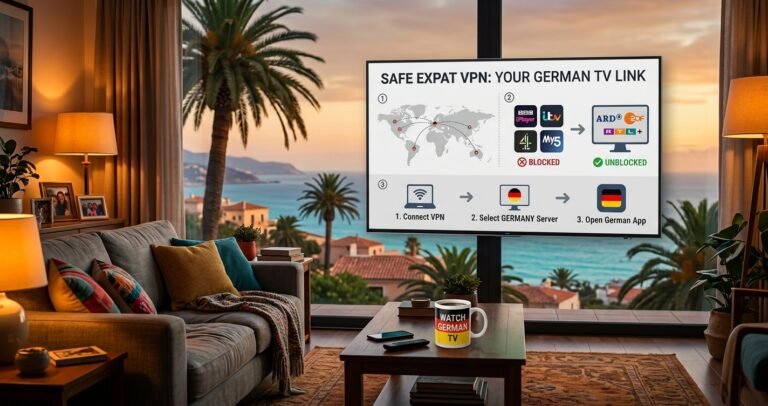
The fix is the same everywhere. Connect to a German server before you open the app or the tool, and the programme becomes available, the icon returns and the file saves normally. The finished copy then plays offline wherever you are.
How to Do an ARD Mediathek Download From Abroad
Step 1: Choose a reliable VPN (we tested and recommend NordVPN or Surfshark) and install the app on your phone and computer.
Step 2: Connect to a server in Germany, such as Frankfurt or Berlin.
Step 3: Open the ARD app or MediathekView. Clear the app cache or restart the tool if you tried before without the VPN.
Step 4: Start the download. Keep the VPN connected until the save is complete.
Best VPNs for ARD Mediathek Download Abroad
NordVPN is our first choice. Its large German server network in Frankfurt and Berlin always has a working address, and NordLynx keeps long saves fast and stable. SmartPlay also brings the Mediathek to smart TVs. 30-day money-back guarantee. Read our NordVPN review.
Surfshark is the best value if you save programmes on several phones, tablets and computers, because one plan covers unlimited devices. Fast German servers keep downloads quick. Read our Surfshark review.
Proton VPN is the privacy pick, from a Swiss company with an independently audited no-logs policy. Its German servers are fast, and the Stealth protocol works on restricted networks in the Gulf. Read our Proton VPN review.
Save ARD Mediathek Videos on Every Device
Surfshark covers unlimited devices with fast German servers.
30-day money-back guarantee · 87% off + 3 months free
Watching ARD Mediathek on a Smart TV Abroad
TV devices have no offline function, so the only question there is whether the stream plays. With a VPN on a Fire TV Stick or Android TV, or NordVPN SmartPlay on Samsung and LG, the ARD Mediathek app works abroad. Our guide to ARD Mediathek on a smart TV abroad covers each device.
Copyright and Terms of Use
Saving programmes for your own offline viewing is a normal use case that ARD itself supports in the app. Uploading, sharing or selling saved programmes breaches the ARD terms of use and copyright law.
DRM-protected titles cannot be saved by any general tool. Stick to the freely streamed public catalogue for personal viewing, and VPN use itself is legal in Germany and most countries.
Make Your ARD Mediathek Download Work First Time
Connect to a German server and the app and desktop tools behave exactly as they do in Germany. 30-day money-back guarantee.
Best Overall
NordVPN
Large German network and fast NordLynx downloads.
30-day money-back guarantee · 78% off + 3 months free
Best Value
Surfshark
Unlimited devices on one plan for the whole household.
30-day money-back guarantee · 87% off + 3 months free
Best Privacy
Proton VPN
Swiss jurisdiction, Stealth protocol and audited no-logs apps.
30-day money-back guarantee · 75% off
ARD Mediathek Download: FAQ
Is there an official ARD Mediathek download option?
Yes, in the ARD Mediathek app for Android and iOS. Saved programmes play only inside the app and expire when the licence window ends.
How do I download ARD Mediathek videos on a PC?
Use MediathekView or yt-dlp. Both are free and save normal video files on Windows, Mac or Linux.
Why is the download icon missing?
Either the title is excluded from offline viewing, or you are outside Germany and the programme is geo-restricted. Connect to a German server and the icon returns.
Does an ARD Mediathek download work abroad?
Yes, once you connect to a German server with a VPN such as NordVPN. The saved copy then plays offline anywhere.
Can I save ARD Mediathek videos as MP4?
Not in the official app. MediathekView and yt-dlp save normal video files, except for DRM-protected titles.
Related Guides
- How to Watch ARD Mediathek Abroad
- ARD Mediathek Not Working Abroad
- ARD Mediathek on Smart TV Abroad
- ARD Mediathek on Apple TV Abroad
- Watch Das Erste and Tagesschau Outside Germany
- ZDF Mediathek Abroad
- Best VPN for Germany
Expat Essentials
Affiliate Disclosure: This article contains affiliate links. If you purchase a VPN through our links, we may earn a commission at no additional cost to you.